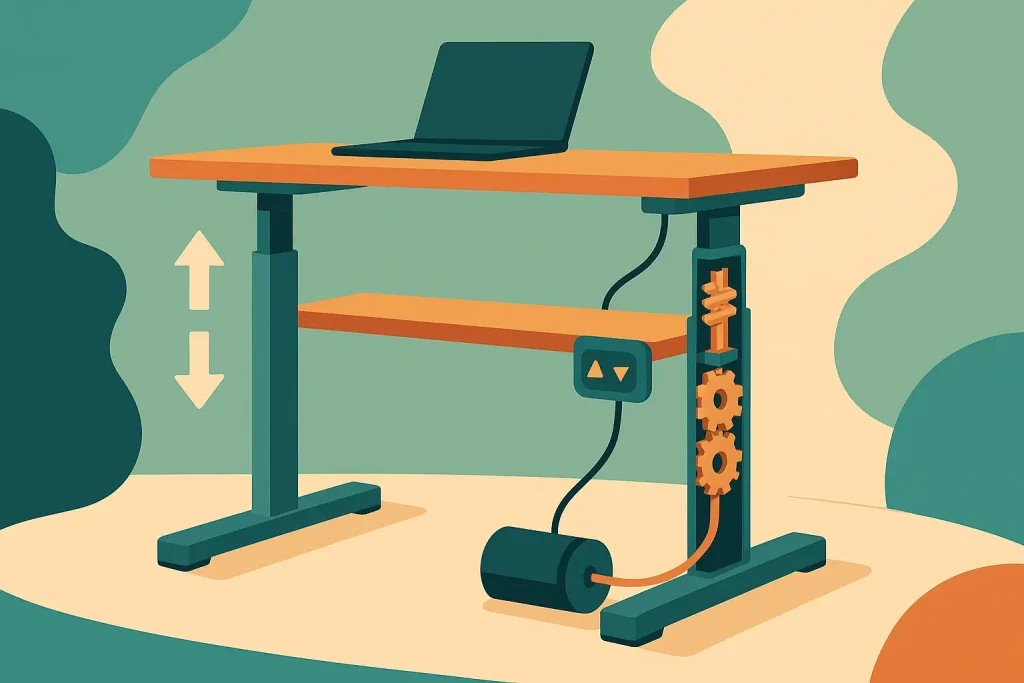
You press a button. Your desk rises smoothly. Magic?
Not quite. Electric standing desks rely on surprisingly straightforward technology that’s been refined over decades. Understanding how they work can help you choose the right desk, troubleshoot problems, and appreciate the engineering behind this increasingly popular office furniture.
Let’s break down the mechanics, motors, and control systems that make these desks function.
The Basic Components of an Electric Standing Desk
Every electric standing desk consists of several key components working together. Strip away the desktop surface and you’ll find a system that’s elegant in its simplicity.
The motor (or motors). This is the heart of the system. Most desks use either one or two electric motors to generate the lifting power. Dual-motor systems are more common in higher-quality desks because they provide better stability and can handle heavier loads.
The lifting columns. These telescoping legs house the motor mechanism and physically raise or lower the desk. They’re typically made from steel or aluminum and contain multiple nested tubes that extend and retract.
The control box. Think of this as the desk’s brain. It processes your input from the control panel, manages power distribution to the motors, and ensures both legs move in perfect synchronization.
The control panel. This user interface lets you adjust the desk height. Basic models have simple up and down buttons. Advanced versions include memory presets, digital displays, and programmable height settings.
The power supply. Electric desks plug into standard wall outlets and convert AC power to the DC voltage needed by the motors.
These components work in concert to create smooth, reliable height adjustment.
How the Motors Generate Lifting Power
Electric standing desk motors are specialized linear actuators. They convert electrical energy into mechanical motion, but not in the way you might expect.
Most desks use DC motors paired with a spindle drive mechanism. Here’s how it works:
The motor spins a threaded rod (the spindle) inside the lifting column. A nut attached to the inner tube of the column sits on this threaded rod. As the spindle rotates, the nut either moves up or down, depending on the direction of rotation. This causes the inner tube to extend or retract.
It’s essentially a motorized screw mechanism.
The threading on the spindle determines the lifting speed. Finer threads mean slower movement but greater lifting force. Coarser threads allow faster height adjustment but with less power. Manufacturers balance these factors based on their target weight capacity and user preferences.
Motor placement varies between desk models. Some desks have a single motor that drives both legs through a synchronized shaft or cable system. Others use dual motors with one in each leg for independent power.
Dual-motor systems offer several advantages:
- Better weight distribution
- Higher total weight capacity
- Reduced strain on individual motors
- More stable lifting, especially with uneven loads
Single-motor systems are typically found in budget desks. They work fine for lighter setups but may struggle with heavy monitors, multiple displays, or dense desktop materials.
The Role of the Control Box
Your control box does more than just turn motors on and off. It’s a sophisticated piece of electronics that ensures safe, smooth operation.
Synchronization is critical. If one leg moved faster than the other, your desk would tilt. Your coffee would spill. Your monitors would wobble dangerously. The control box constantly monitors motor speed and adjusts power delivery to keep both legs perfectly aligned.
This happens through feedback sensors that track the position of each leg. If one leg starts to lag behind, the control box increases power to that motor or reduces power to the faster one. The adjustments happen in milliseconds, far faster than human perception.
Safety features are built in. Most control boxes include:
- Overload protection that stops the motors if weight exceeds capacity
- Overheat protection that prevents motor damage from extended use
- Anti-collision sensors that detect obstacles and reverse direction
- Height limit settings to prevent damage to the desk frame
These safety mechanisms protect both your equipment and the desk itself.
Memory functions in programmable desks are stored in the control box. When you save a preferred height setting, the control box records the exact motor positions. Press the memory button and the desk automatically adjusts to that stored height.
Understanding Lifting Columns and Telescoping Mechanisms
The lifting columns are where the actual height change happens. They’re engineered to be strong, stable, and smooth in operation.
Most electric standing desks use two-stage or three-stage columns. The number of stages refers to how many nested tubes make up each leg.
Two-stage columns have:
- An outer tube (fixed to the desk base)
- An inner tube (attached to the desktop)
Three-stage columns add a middle tube between these two. More stages mean greater height range. A three-stage desk can typically adjust from around 24 inches to 50 inches, while two-stage desks usually max out around 45 inches.
The trade-off? Stability. Each additional stage introduces a potential point of wobble. Three-stage desks at maximum height can feel less solid than two-stage desks, especially if you’re typing vigorously or leaning on the surface.
Inside each column, the tubes slide past each other on plastic or metal guides. Quality desks use reinforced guides that minimize lateral movement. Cheaper desks may develop wobble over time as these guides wear.
The spindle mechanism we mentioned earlier drives the extension. As the threaded rod rotates, it pushes the inner tube upward or pulls it downward. Some high-end desks use belt-driven systems instead of spindles, which can be quieter and smoother, though they’re more expensive to manufacture.
Control Panel Options and User Interface
How you interact with your desk varies significantly based on the control panel design.
Basic panels feature simple up and down buttons. Hold the up button, the desk rises. Release it, movement stops. Straightforward and reliable, but you’ll need to manually adjust to your preferred height each time.
Digital displays show the current height in inches or centimeters. This helps you find your ideal position and return to it consistently, even without memory presets.
Memory preset panels are game-changers for shared workspaces. You can program multiple height settings (typically 2-4 positions) and switch between them with a single button press. If you share a desk with a colleague, you each save your preferred heights and switch instantly.
Some advanced panels include:
- Sit/stand timers that remind you to change positions
- Bluetooth connectivity for smartphone control
- USB charging ports for devices
- Cable management clips
Touch-sensitive panels are appearing on premium desks. They respond to taps rather than physical button presses, creating a more modern aesthetic.
The control panel connects to the control box via a cable that runs along the desk frame. Wireless panels exist but are rare because they require battery power and add unnecessary complexity.
Power Consumption and Efficiency
Electric standing desks are surprisingly energy-efficient. The motors only draw significant power during height adjustment, which typically lasts 10-30 seconds.
During adjustment, a dual-motor desk might consume 150-300 watts. That’s similar to a laptop or desktop computer. Once the desk reaches your desired height and stops moving, power consumption drops dramatically.
In standby mode, most desks use less than 0.5 watts. That’s negligible on your electricity bill. Even if you adjust your desk 10 times per day, the annual energy cost is usually under $5.
Some desks include power-saving features that completely cut power to the motors when not in use. Others maintain a small standby draw to keep memory settings active and respond instantly to button presses.
Common Mechanisms: Spindle vs. Belt Drive
While spindle drives dominate the market, belt-driven systems are worth understanding.
Spindle drive advantages:
- Lower cost to manufacture
- Simple, proven design
- Easy to repair or replace
- Good lifting capacity
Spindle drive disadvantages:
- Can be noisier (you’ll hear the motor and mechanical movement)
- May require periodic lubrication
- Slightly slower height adjustment
Belt drive advantages:
- Quieter operation
- Smoother movement
- Faster height adjustment
- Less maintenance
Belt drive disadvantages:
- Higher cost
- More complex to repair
- Belts can wear over time
Most users won’t notice a dramatic difference in daily use. Both systems are reliable when properly manufactured.
Weight Capacity and Load Distribution
Electric standing desks have specified weight capacities, typically ranging from 150 to 350 pounds. This number reflects the maximum load the motors and frame can safely lift and support.
But weight distribution matters. A 200-pound capacity desk can handle that weight when it’s evenly distributed across the surface. Concentrate all that weight on one corner, and you risk damaging the frame or causing instability.
The lifting mechanism is strongest when:
- Weight is centered on the desktop
- The desk isn’t at maximum height (leverage increases strain)
- Both legs are evenly loaded
Heavy monitor arms can create uneven weight distribution, especially if mounted at the desk edge. This puts extra stress on one lifting column. Quality desks handle this fine, but it’s worth considering during setup.
Desktop material also matters. A solid wood top might weigh 60-80 pounds by itself, reducing the capacity available for your equipment. Particle board or laminate tops are lighter, leaving more capacity for monitors, computers, and accessories.
Speed and Noise Levels
How fast should a standing desk adjust? Most electric models move at 1-1.5 inches per second. That means a transition from sitting (29 inches) to standing (45 inches) takes about 11-16 seconds.
Faster isn’t always better. Very rapid adjustment can cause items on your desk to shift or wobble. The current speed range represents a good balance between convenience and stability.
Noise levels vary significantly between desks. Budget models might produce 50-60 decibels during movement, roughly the volume of normal conversation. Premium desks with quality motors and well-lubricated mechanisms can operate at 40-45 decibels, similar to a quiet library.
If you work in an open office or noise-sensitive environment, this difference matters. Nobody wants their desk adjustment to interrupt conference calls or disturb colleagues.
Maintenance and Longevity
Electric standing desks are relatively low-maintenance, but they’re not completely maintenance-free.
Regular care includes:
- Checking bolts and connections for tightness every few months
- Cleaning dust from the lifting columns
- Ensuring the power cable isn’t pinched or damaged
- Keeping the desk clear of obstacles during adjustment
Some manufacturers recommend lubricating the lifting mechanism annually, especially for spindle-drive systems. This keeps movement smooth and reduces motor strain. Check your manual for specific recommendations.
Motors typically last 10,000-20,000 cycles before needing replacement. If you adjust your desk 5 times per day, that’s 5-10 years of use. Many desks outlast these estimates with proper care.
Control boxes and panels rarely fail unless subjected to power surges or physical damage. Using a surge protector is smart insurance.
Choosing the Right Electric Standing Desk
Understanding the mechanics helps you evaluate options. Not all electric desks are created equal.
Consider these factors:
- Motor quality and number (dual motors are preferable)
- Weight capacity that exceeds your current setup
- Height range that accommodates your body dimensions
- Column stability (especially at maximum height)
- Noise level if working in shared spaces
- Warranty coverage on motors and electronics
Testing a desk in person reveals qualities that specifications can’t capture. How smooth does it feel? Any wobble at standing height? Is the control panel intuitive?
Read reviews from long-term users. Early failures and quality issues become apparent after months or years of daily use.
The Bottom Line
Electric standing desks work through a combination of DC motors, threaded spindle mechanisms, and intelligent control systems. The technology is mature, reliable, and surprisingly efficient.
You don’t need to be an engineer to choose a good desk, but understanding the mechanics helps you separate quality products from cheap imitations. Look for dual motors, solid construction, and responsive customer support.
The right desk will serve you for years, smoothly transitioning between sitting and standing positions with the press of a button. It’s technology in service of better health and comfort.
Ready to find the perfect electric standing desk for your workspace? Browse through a wide selection of electric standing desk options to compare features, weight capacities, and designs that match your specific needs and budget.